Casio EX-Z700 Manuale Utente Pagina 78
- Pagina / 247
- Indice
- SEGNALIBRI

- K810FCM1DMX 1
- 請檢查確認下示所有相機及附件齊全 2
- 若有缺少請盡快與您的經銷商聯絡 2
- 51 基本影像拍攝 3
- 74 其他拍攝功能 4
- 154 檔案的刪除 5
- 156 檔案管理 5
- 162 其他設定 6
- 174 記憶卡的使用 6
- 181 影像的列印 6
- 192 如何在電腦上檢視影像 7
- 208 相機與電腦的配合使用 7
- ■ 基本注意事項 12
- ■ 使用相機之前請進行正常動作測試﹗ 14
- ■ 數據錯誤注意事項 15
- ■ 顯示幕畫面上的影像 17
- 首先﹐對電池進行充電﹗ 18
- 如何配置顯示語言及時鐘設定 19
- 2, 3, 4, 5 21
- ■ 畫面顯示文字 22
- 100-0023 28
- 顯示幕內容的變更 30
- 如何對電池進行充電 33
- [CHARGE] 34
- ■ 若相機動作不正常 36
- ■ 電池電量指示符 36
- ■ 加長電池使用時間的技巧 37
- ■ 電池處理須知 38
- ■ USB底座及交流電變壓器注意事項 41
- 相機的開機與關機 42
- ■ 如何關閉相機電源 43
- 用 [왖] 及 [왔] 鈕改變目前所選設定﹐然後按 44
- 按電源鈕或 [ ] 45
- 按 [MENU] 鈕 45
- ● 選單畫面操作 46
- • 除按 [왘] 鈕之外﹐您 46
- 還可以按 [SET] 鈕 46
- 執行下示操作之一採用您配置的設定 47
- 範例﹕2006年12月24日 49
- 按 [SET] 鈕登錄設定並退出設定畫面 50
- 設定目前日期及時 50
- 將快門鈕按下一半對影像進行 54
- ■ 關於AF輔助光 55
- ■ 拍攝注意事項 56
- ■ 關於自動聚焦 57
- ■ 關於REC方式顯示畫面 58
- 對影像進行取景後按快門鈕 59
- ■ 如何使用數位變焦拍攝影像 60
- 當變焦指針到達光學數位變焦轉換點時﹐其 61
- ■ 如何打開或關閉數位變焦 62
- 按快門鈕拍攝影像 63
- 在REC方式中﹐按 [왔] ( ) 鈕 63
- ■ 關於輕減紅眼 64
- 當閃光燈可以閃光時﹐顯示幕 65
- 閃光強度設定的變更 66
- 閃光輔助功能的使用 66
- ■ 閃光燈注意事項 67
- 自拍定時器的使用 68
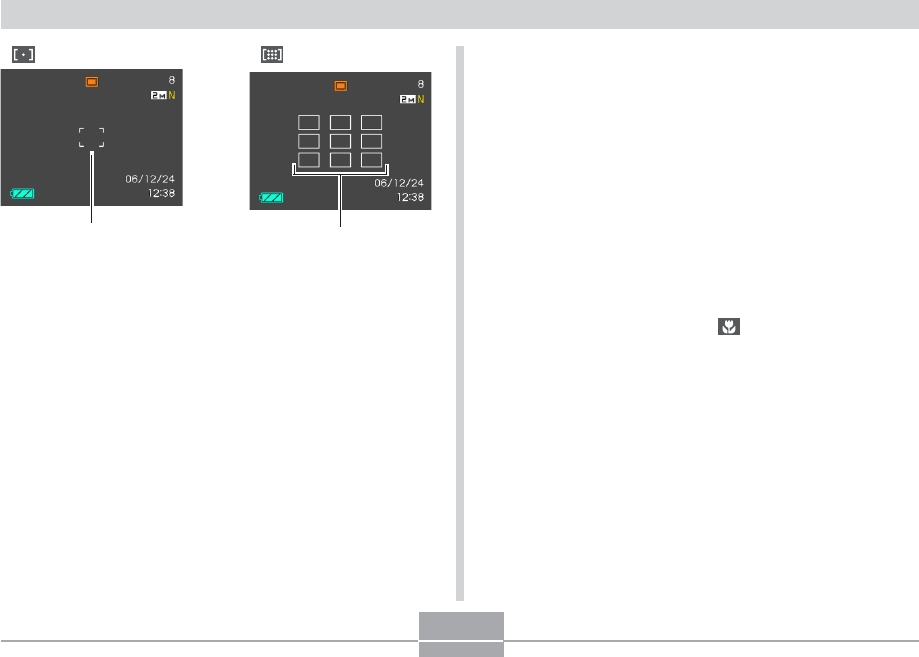
- ■ 自動聚焦區的指定 77
- * ○○處將表示實際的聚焦範圍值 79
- 無窮遠方式的使用 80
- 曝光補償(EV平移) 83
- 用 [왖] 及 [왔 ] 鈕選擇所需要的設定﹐然後按 85
- 白色平衡設定的手動配置 86
- 用 [왖] 及 [왔] 鈕選擇 88
- “常速連拍”、“高速連 88
- 拍”或“閃光連拍”﹐ 88
- 然後按 [SET] 鈕 88
- BEST SHOT(最佳攝影)方式的使用 90
- 如何顯示各別示範場景 92
- 自創BEST SHOT設置 93
- 如何刪除BEST SHOT方式用戶設置 94
- 如何抑制因手或主體的移動所造成的影響 95
- ■ 設置示範影像 97
- 在使用Business Shot進行拍攝之前 98
- 如何使用Business Shot功能 98
- 在嘗試復原舊照片之前 99
- 如何以多幅影像版面拍攝快照(版面拍 102
- 按快門鈕拍攝第一幅 103
- 再次按快門鈕拍攝下一幅快照 103
- 移動中主體的自動追蹤(自動取景) 104
- 要停止動畫的拍攝時﹐請再次按下快門鈕 107
- ■ 動畫拍攝須知 107
- ■ 錄音注意事項 111
- REC方式相機設定 114
- 如何在 [왗] 及 [왘] 鈕上配置功能 115
- 如何打開及關閉畫面格柵 116
- 如何打開及關閉影像檢視功能 116
- 圖示幫助功能的使用 117
- 如何指定開機預設設定 118
- ISO敏感度的指定 120
- 濾光器功能的使用 122
- 色彩飽和度的指定 123
- 資料夾名檔案名 126
- 在PLAY方式中﹐按 [왗] 及 [왘] 鈕直至需要的 127
- 影像顯示出來為止 127
- 按 [SET] 鈕 127
- 如何使用色彩復原功能校正舊照片的色彩 133
- 左右推動變焦控制器改變裁剪框的大小 134
- 用 [왖]、[왔]、[왗] 及 [왘] 鈕將裁剪框移動至所 134
- 需要的位置﹐然後按 [SET] 鈕 134
- 動畫的播放及編輯 135
- ■ 如何裁剪一幀特定畫面之前或之後的所有影像 137
- ■ 如何裁剪選定的兩幀畫面間的影像 138
- 動畫中靜止影像的捕捉(MOTION 140
- 顯示9幅影像畫面 141
- 相片架功能的使用 146
- 在PLAY方式中﹐用 [왗] 及 [왘] 鈕顯示您要播 150
- 放的錄音檔案(標記有 的檔案) 150
- 如何在電視螢幕上顯示相機影像 151
- 如何選擇視頻輸出制式 153
- 如何刪除單個檔案 154
- 如何刪除全部檔案 155
- 記憶體中的資料夾及檔案 156
- 如何保護單個檔案 157
- 如何保護記憶體中的全部檔案 158
- 如何將檔案複製於FAVORITE資料夾 158
- 如何顯示FAVORITE資料夾中的檔案 160
- 如何從FAVORITE資料夾刪除檔案 161
- 如何從FAVORITE資料夾刪除全部檔案 161
- 如何配置聲音設定 162
- 如何設定確認音的音量水平 162
- 如何設定動畫及配音快照播放的音量水平 163
- 檔案名序列編號生成方法的指定 164
- 如何選擇本地時區 165
- 如何設定目前時間及日期 166
- 如何顯示世界時間畫面 167
- 如何配置世界時間設定 167
- 影像的日期及時間的編輯 168
- 如何變更顯示語言 169
- 顯示幕亮度的變更 170
- USB端口協議的變更 171
- [ ] (REC) 及 [ ] (PLAY) 鈕開機關機 172
- 內置記憶體的格式化 173
- 如何將記憶卡插入相機 175
- ■ 如何格式化記憶卡 177
- ■ 記憶卡注意事項 178
- 如何將內置記憶體中的全部檔案複製於記 179
- 如何將一個指定檔案從記憶卡複製於內置 180
- ■ 個人化列印服務 181
- ■ 直接在配備有卡槽﹐或支援USB DIRECT 181
- PRINT或PictBridge的印表機上進行列印 181
- ■ 在電腦上列印 182
- 如何對單幅影像配置列印設定 183
- 如何配置全部影像的列印設定 184
- Exif Print 191
- PRINT Image Matching III 191
- 如何在電腦上檢視影像 192
- [DC IN 5.3V] 194
- 根據Windows作業系統的版本﹐按照下述操作 198
- 之一結束USB連接 198
- ■ USB 連接須知 199
- 記憶體資料夾結構 205
- 本相機支援的影像檔案 206
- ■ 內置記憶體及記憶卡注意事項 207
- 如何選擇所需要的軟體 208
- 相機與電腦的配合使用 209
- 電腦上影像的管理 211
- ■ 如何檢視“自述檔案” 212
- ■ Photo Loader的安裝 212
- ■ 如何檢查DirectX的版本 213
- 快照的潤飾、方向調整及列印 214
- ■ Photohands的安裝 215
- ■ 動畫播放須知 215
- 如何向相機傳送影像 216
- ■ 如何閱覽“自述檔案”檔案的內容 217
- ■ 如何安裝Photo Transport 218
- ■ Photo Transport的使用 218
- 如何檢視用戶文件(PDF檔案) 220
- 選單應用程式的結束 221
- Macintosh電腦上的影像管理 224
- ■ 如何閱覽Photo Loader的用戶說明書 226
- ● 像質標籤選單 228
- ● 設置標籤選單 228
- ■ PLAY方式 229
- ■ USB底座指示燈 232
- • 將閃光方式設定改為“ ”(強制閃光)﹐使 235
- • 提高EV平移值(第83頁) 235
- 若安裝USB驅動程式時遇到了問題。。。 238
- • 使用光學變焦會使上述範圍改 242
- ■ 鋰離子充電電池 (NP-40) 245
- ■ USB底座 (CA-29) 245
- CASIO COMPUTER CO.,LTD 247
- 6-2, Hon-machi 1-chome 247
Prodotti e manuali riguardandi no Casio EX-Z700
 (78 pagine)
(2 pagine)
(78 pagine)
(2 pagine)
 (139 pagine)
(265 pagine)
(139 pagine)
(265 pagine)
 (2 pagine)
 (202 pagine)

 (30 pagine)
 (2 pagine)
(2 pagine)
(2 pagine)

 (2 pagine)
(233 pagine)
(18 pagine)
(145 pagine)
(2 pagine)
(233 pagine)
(18 pagine)
(145 pagine)
 (289 pagine)
© 2020, manymanuals.it. Tutti i diritti riservati | 0.156 s |
 Manymanuals.com
 Manymanuals.de
 Manymanuals.fr
 Manymanuals.it
 Manymanuals.pl
 Manymanuals.cz
 Manymanuals.es
 Manymanuals-pt.com
Commenti su questo manuale